Nuva team
How to Join Nuva as a Talent: Step-by-Step Guide + Free Studio Photoshoot for the First 300 Members
Ready to explore new opportunities with your digital likeness? Follow our step-by-step guide to joining Nuva, from creating your Talent Profile and verifying your identity to setting licensing preferences. Plus, find out how to claim a free professional photoshoot in Bangkok.
Your likeness could open doors to new opportunities in the age of AI. Here's how to get started on Nuva—and how to claim a complimentary professional photoshoot if you're among the first 300 eligible members.
Imagine appearing in a global advertising campaign, being featured in a fashion editorial, starring in a film, or even becoming a character in a video game—all without having to be physically present for every production.
With advances in AI and digital likeness technology, these possibilities are becoming part of a new creative economy.
Nuva is a digital likeness licensing platform that connects Talent with producers, brands, and creators. It gives you a way to license your digital likeness for approved creative projects, set your own prices, and decide how your likeness can be used.
Whether you're an actor, model, content creator, or simply someone curious about new opportunities, you can get started.
And if you don't have professional-quality photos yet, there's another reason to join: Nuva is offering complimentary studio photoshoots in Bangkok to the first 300 eligible members.
Here's everything you need to know about signing up, setting up your profile, and claiming your photoshoot.
Step 1: Create Your Nuva Talent Account
Getting started is simple.
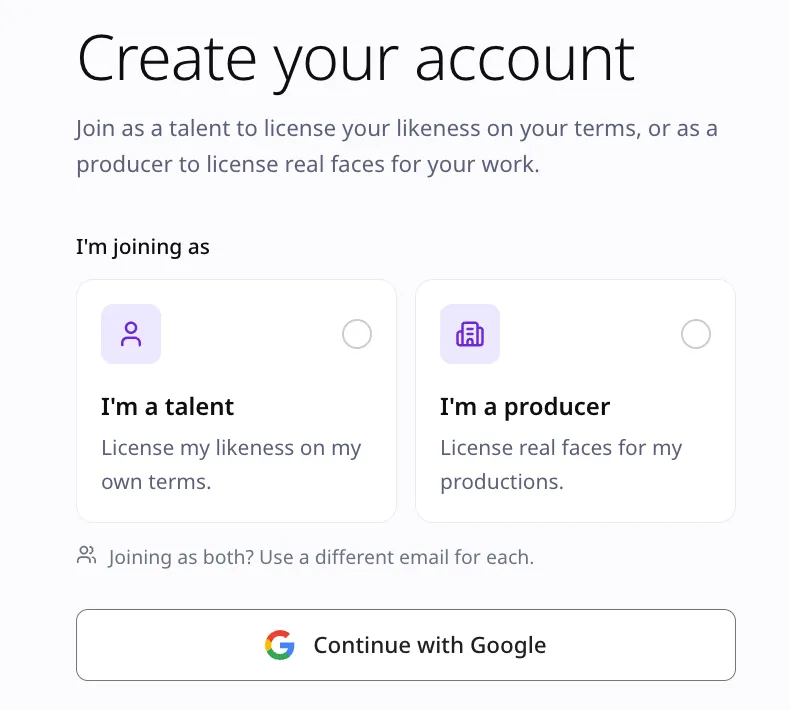
Visit the Nuva Sign-Up Page, select Talent, and register using your email address.
Your Talent account is where you'll build your profile, manage your digital likeness, set your licensing preferences, and explore opportunities from producers.
Joining Nuva is completely free. There are no registration fees or monthly subscription charges.
Step 2: Set Up Your Talent Profile
Once you've created your account, it's time to introduce yourself.
Start by choosing your Stage Name—the name you'd like to be known by on Nuva.
You can also add details about your background, experience, and creative interests to help producers get to know you and understand which projects might be a good fit.
If you're a creator, actor, or model, a well-written profile is a great opportunity to showcase your personality and professional experience.
The more relevant and informative your profile is, the easier it may be for producers to discover you and consider you for licensing opportunities.
Can Producers Use My Real Name or Personal Biography?
No. Purchasing a digital likeness license does not automatically give producers permission to use your real name, personal biography, or other identifying information in advertisements, product endorsements, or commercial promotions.
Your Talent Profile helps producers discover and evaluate potential Talent.
However, the rights granted under a Nuva license are limited to the authorized use of your digital likeness, not your real-life identity or personal information.
Nuva's Producer Agreement expressly restricts the unauthorized use of a Talent's real identity.
Your profile helps producers find you. It doesn't give them ownership of who you are.
Step 3: Verify Your Identity (eKYC)
Before your digital likeness can be made available for licensing, you'll need to complete Nuva's identity verification process, known as eKYC (electronic Know Your Customer).
You can verify your identity using one of the following documents:
- National ID card
- Passport
- Driver's license
Why Does Nuva Require Identity Verification?
Your digital likeness is closely tied to your real identity.
Identity verification helps Nuva confirm that you're a real person and supports the verification of your right to license the likeness you're submitting.
It also helps reduce the risk of impersonation and unauthorized attempts to license someone else's identity.
Your Personal Information Matters to Us 🔒
We understand that uploading an identity document is a significant step.
That's why Nuva uses a specialized eKYC service provider with robust security measures for handling and protecting personal information.
Your verification documents are processed through the provider's identity verification system, with security measures designed to reduce the risk of unauthorized access.
You can complete your verification with greater peace of mind, knowing that protecting your personal information is an important part of Nuva's onboarding process.
Step 4: Upload Your Digital Likeness Photos
Great digital likeness results start with great reference photos.
To help AI capture your natural facial features, expressions, and body proportions as accurately as possible, Nuva requires 8 standard reference photos, divided into two categories.
1. Close-Up Photos — 5 Shots
You'll need five clear photos of your face:
- Front-facing, neutral expression: 1 photo
- Front-facing, smiling: 1 photo
- 45-degree angles: 2 photos, one from the left and one from the right
- 90-degree side profile: 1 photo
2. Full-Body Photos — 3 Shots
You'll also need three full-body photos:
- Front-facing: 1 photo
- 45-degree angle: 1 photo
- Side view: 1 photo
Want to Show More of Your Personality?
You can upload up to 5 additional photos beyond the standard eight.
There are no restrictions on shooting distance for these optional images, so feel free to choose photos that showcase different expressions, looks, or aspects of your personality.
What Are the Photo Quality Requirements?
All reference photos should be captured using professional studio equipment or a high-quality camera capable of producing sharp, detailed images.
To meet Nuva's standards, your photos must have:
- 8K resolution or higher
- Sharp focus with clearly visible facial features and body proportions
- Balanced lighting, without excessive shadows or overexposure
- No face-altering beauty filters
- No excessive retouching that changes your natural appearance
The goal is simple: your digital likeness should look like you.
Don't have photos that meet these requirements?
You may still be eligible for a complimentary photoshoot at one of Nuva's partner studios in Bangkok.
We'll explain how to claim your photoshoot later in this guide.
Step 5: Choose Your License Types, Set Your Prices, and Control Your Approvals
Now comes one of the most important parts of your Nuva profile: deciding what kinds of projects you'd like to be part of—and how much control you want over each licensing request.
Nuva lets you configure your licensing preferences based on the types of work you're comfortable accepting.
Choose the License Categories You Want to Offer
Nuva offers four main digital likeness license categories:
- B1 — Film, Series & Music Video: Films, television series, and music videos
- B2 — Advertising & Commercial: Advertisements, brand campaigns, and commercial marketing
- B3 — E-commerce & Fashion Editorial: Fashion editorials, product imagery, and e-commerce content
- B4 — Game & Gaming: Video games and digital characters
You can choose which categories to make available and set your own licensing price for each one.
You can also configure Add-on Licenses for additional usage rights that you're willing to offer.
Want to understand what each license covers?
Explore Nuva's Four Digital Likeness License Types and How Your Rights Are Protected
Set Your License Prices in USD
You can set your licensing prices in US dollars (USD).
When you receive a payout, Nuva will convert the amount into the applicable currency based on the exchange rate and conditions associated with your receiving account.
Choose How You Want to Approve Projects
Nuva offers two approval modes, so you can choose the level of involvement that works best for you.
Auto-Casting ON — Instant Licensing
Want to make your likeness available for eligible projects without reviewing every request?
With Auto-Casting enabled, Nuva can automatically issue licenses for standard projects that match your predefined license categories, pricing, usage permissions, and other conditions.
It's a convenient option if you're comfortable giving advance approval for projects that meet your criteria.
Auto-Casting OFF — Manual Approval
Prefer to review every opportunity yourself?
With Manual Approval, you can evaluate individual licensing requests before deciding whether to allow a producer to use your digital likeness.
What About Sensitive Scenarios?
Sensitive Scenario requests are never automatically approved, regardless of your Auto-Casting settings.
Some projects may involve sensitive situations, such as romantic scenes, kissing scenes, or other content that could affect how your likeness is portrayed.
For these situations, you can choose between:
- Send to Me for Approval: Receive requests and decide whether to approve them individually.
- Automatically Decline: Automatically reject requests involving those scenarios.
If you choose to review sensitive requests, Nuva will first assess the request before forwarding it to you.
You'll then be able to review the producer's Creative Brief and project details before giving your explicit consent.
More opportunities shouldn't mean less control over your identity.
Don't Have Professional Photos? Claim a Free Studio Photoshoot in Bangkok
Not everyone has access to a professional camera, studio lighting, or 8K-quality images.
And that's okay.
To help eligible Talent get started, Nuva is covering the cost of professional studio photoshoots for the first 300 qualifying members.
Where Will the Photoshoot Take Place?
Nuva has partnered with Linked U Studio, a professional portrait studio in Bangkok, to provide the required reference photography for eligible Talent.
Linked U Studio has three locations in major Bangkok shopping malls, with convenient access to BTS Skytrain and MRT stations.
The participating locations are:
- Samyan Mitrtown
- Central Rama 9
- CentralWorld
For members who qualify for the promotion, Nuva covers the photoshoot cost, so you won't need to pay the studio for the included service.
This initiative is designed to make it easier for new Talent to join Nuva, even if they don't already have studio-quality reference photos.
How to Claim Your Complimentary Photoshoot
Follow these five steps to request your free studio session.
Step 1 — Sign Up as a Talent
Visit the Nuva Sign-Up Page, select Talent, and register using your email address.
Step 2 — Complete Your Talent Profile
Enter your Stage Name and the required information to set up your profile.
Step 3 — Complete eKYC Verification
Verify your identity through Nuva's eKYC system.
Step 4 — Upload at Least One Photo
Don't have all eight required reference photos yet?
That's fine. Upload at least one photo you already have to complete the initial registration steps before requesting your complimentary photoshoot.
You don't need to have all eight studio-quality images ready before contacting Nuva.
Step 5 — Contact Nuva to Claim Your Photoshoot
Once you've completed the steps above, reach out to our team through either of these official channels:
- LINE Official Account: @nuva.official
- WhatsApp: @nuva.license
Simply send us a message saying:
"Hi, I've registered as a Nuva Talent and would like to claim the complimentary studio photoshoot."
Our team will check your registration, confirm availability, and help coordinate your appointment with our partner studio.
Please note: The complimentary photoshoot promotion is limited to the first 300 eligible members and is subject to Nuva's verification, availability, and booking conditions.
Important: Beware of Scams and Upfront Payment Requests
Nuva never asks Talent applicants to pay upfront fees.
This includes registration fees, identity verification fees, or advance payments to secure a complimentary photoshoot.
Please be cautious of anyone claiming to represent Nuva who requests payment or sensitive personal information through unofficial channels.
If you receive a suspicious message or payment request, contact Nuva directly through our official communication channels before taking any action.
Your Next Opportunity Starts Here
AI is changing how films, advertisements, fashion campaigns, and digital content are created.
For Talent, that means new ways to take part in creative projects—without always needing to attend an in-person casting or photoshoot.
Nuva gives you a place to explore these opportunities while defining how your digital likeness may be used, setting your own licensing prices, and choosing how you want to approve projects.
Whether you're already working in the creative industry or just beginning to explore what's possible, your journey starts with creating your Talent Profile.
Your Identity. Your Opportunity.
Join Nuva for free, and if you don't yet have the required reference photos, check whether you're eligible for one of our 300 complimentary studio photoshoots in Bangkok.
Want to learn more about licensing rights and safety?
Understanding Nuva's Four Digital Likeness License Types
Disclaimer: Registration, complimentary photoshoot eligibility, licensing approvals, and earnings are subject to Nuva's current terms and policies. Joining Nuva does not guarantee casting opportunities or license sales. High-quality reference photos may help improve the suitability of your digital likeness for potential projects.
#NuvaLicense #DigitalLikeness